
Understand Gemgala Agency Earnings & Withdrawal
Learn how Gemgala Agency income works and how to withdraw your earnings step by step.
 SCROLL
Gemgala Agent Earning Sources
Team commission
Agency task & achievement rewards
Coin seller commission opportunities
Understanding the Coin Seller Agency Commission
Learn the commission table ratio for Gemgala agent coin seller
| Level | Achievement (Last 30 Days) |
Commission Ratio |
|---|---|---|
| 1 | 50.000 | 1% |
| 2 | 150.000 | 2% |
| 3 | 500.000 | 3% |
| 4 | 1.500.000 | 4% |
| 5 | 5.000.000 | 5% |
| 6 | 15.000.000 | 10% |
| 7 | 50.000.000 | 15% |
| 8 | 150.000.000 | 20% |
Achievement = (Total coins top-up/100) + Total gems the last 30 days
The agent commission ratio is calculated based on the cumulative income of the past 30 days (achievement), including all the income of the inviter and the invitee, and is calculated in real time
To join as a coin seller agent, you must make a one-time top-up of $1000 and contact the Gemgala team to apply.
Withdrawal Requirements
- Connect your withdrawal account through MetWallet
- Meet the minimum withdrawal requirement (100.000 Gems)
- Ensure your Gemgala account information is complete
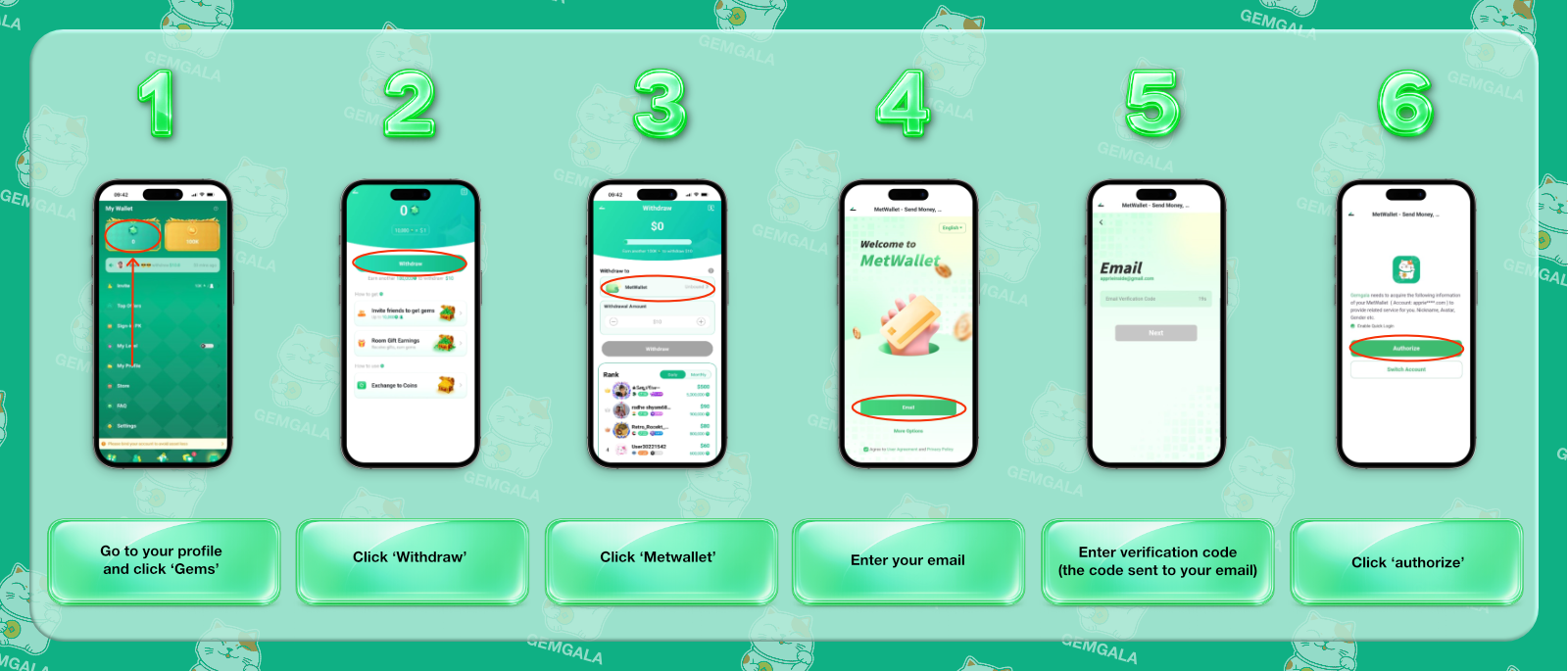
Gemgala Linking MetWallet Tutorial
-
01
Step 1:
Open the Gems menu in your Gemgala profile.
-
02
Step 2:
Select the Withdraw option.
-
03
Step 3:
Select “MetWallet” as your withdrawal method.
-
04
Step 4:
Enter your MetWallet email .
-
05
Step 5:
Complete the email verification process
-
06
Step 6:
Authorize the linking between your MetWallet to Gemgala
Notes: the withdrawal process is done in the MetWallet app
Frequently Asked Questions
FAQ 1: Which method is used for withdrawal?
Gemgala only uses MetWallet as the withdrawal option.
FAQ 2: Where can I find withdrawal settings?
Open your Gemgala profile, select Gems, then choose Withdraw.
FAQ 3: Where can I find the available withdrawal methods?
To find the complete withdrawal methods, please open your MetWallet app.